
Studocu AI Tool Saves Time and Makes Exam Prep Easier


Studocu
Studocu empowers a vibrant, global community of students to excel together. The platform provides access to over 50 million peer-shared study resources and a suite of AI tools that instantly create quizzes and flashcards from any document, helping learners share knowledge and prepare confidently for their exams
Highlights
- Upload all your course materials, slides, recordings, and handwritten notes into one central study hub.
- AI tools transform messy files into organized summaries, exam-style practice quizzes, and instant answers in minutes.
- Access over 50 million shared study resources from students worldwide to fill gaps in your notes.
- Use AI responsibly as a study partner, not a replacement, to stay within academic integrity guidelines.
Studocu AI Tool aims to shrink that busywork. The goal is simple: you do less formatting and more focused exam practice. You stay in control of your learning, while the system helps with the setup.
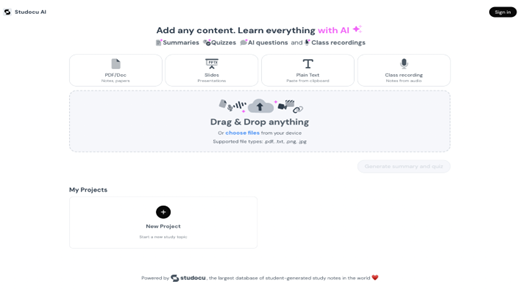
One hub for everything you need for exam preparation
The first step is bringing everything together. Studocu AI lets you upload lecture slides, Word documents, PDFs, plain text files, and even photos of your handwritten notes (.png, .jpg) into a single project. With the mobile app, you can also record class lectures (always with your instructor's permission) and add the audio to your study hub.
- Use case: You're a marketing student working on a case study about Chinese brands in Southeast Asia. You upload your professor's lecture slides (a .pptx file), a research paper you found online (a .pdf), and photos of your brainstorming notes from a study group session. Instead of juggling multiple windows and files, all your core materials are now in one digital workspace, turned into a study guide for your midterm.
Once everything is in one place, the real work begins.
Turn static files into powerful exam prep tools
Studocu AI transforms your uploaded materials into study tools that help you learn faster.
Instant summaries: Upload a 70-page textbook chapter and get a clean outline with headings, key terms, and short takeaways in minutes. Long readings become quick, scan-friendly notes that are easier to review before class or for a final exam cram session.
Image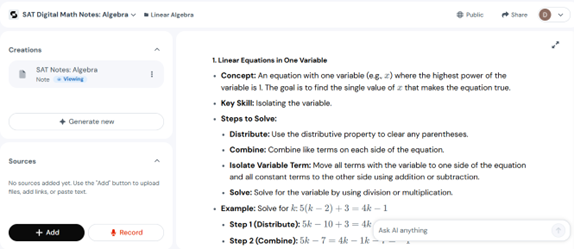
AI-powered Q&A: While reviewing your notes, highlight any section and ask clarifying questions. If a complex theory is confusing, ask the AI to explain it in simpler terms or provide a practical example. This functions like having a personal tutor available 24/7, ready to help you overcome tricky concepts without having to wait for office hours.
Image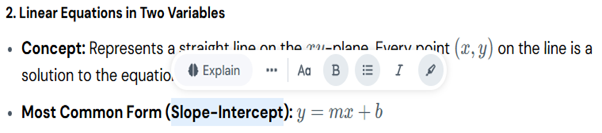 Image
Image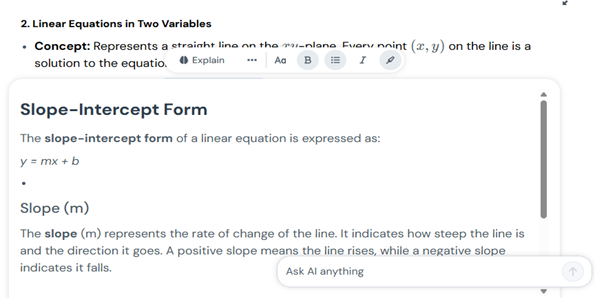
Automated quiz creation: Generate flashcards and practice quizzes from your own materials in seconds. You can also time yourself to stay focused. The focus is on active recall, testing yourself, not just re-reading. That is how you build a durable understanding.
Image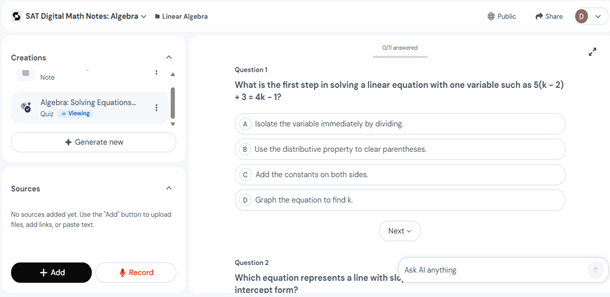
Canvas formatting tools for better organization: As you build your study notes, Studocu AI Canvas lets you format content for faster scanning. You can:
- Add code blocks to format programming snippets, formulas, or technical syntax clearly.
- Insert blockquotes to highlight important definitions, key theories, or instructor quotes.
- Create tables to organize and compare data, timelines, or concept categories side-by-side.
- Embed videos directly into your study canvas for quick reference to lecture recordings or tutorial clips.
- Use inline math to write formulas and equations seamlessly within your notes.
- Add block math to display complex equations and proofs in dedicated, formatted sections.
- Continue writing with AI to expand on concepts, generate examples, or elaborate explanations when you're stuck.Image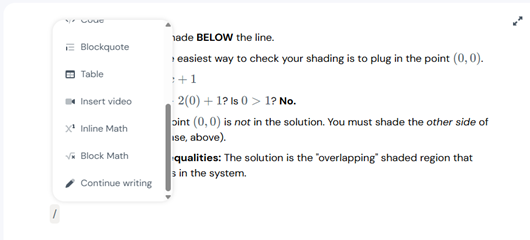
Use case: A computer science student studying algorithms uploads lecture notes. They use code blocks to format pseudocode examples, insert blockquotes for Big O notation definitions, create a table comparing sorting algorithms, and use inline math to write time complexity formulas—turning scattered notes into a professional study guide perfectly organized for final exam prep.
Why does this approach work for better exam preparation?
Two study habits tend to pay off on exam day: short, focused reviews of key ideas and repeated self-testing. When long material becomes a short, quiz-ready set, you can spend more time answering questions and less time preparing them. Over a week, those small gains add up.
Here's a common scenario: You have a stack of notes and slides for one course. You upload them to Studocu AI and get a one-page outline, a 20-question practice quiz, and a flashcard set. Now your next study session is ready to go. You can time yourself, track weak spots, and return to the parts you missed. That is a practical path from "I have so much to cover" to "I know what to do next."
What makes the Studocu AI tool different?
Studocu AI pairs its tools with a large, community-built library of millions of peer-shared documents from 120k institutions worldwide. When your notes are thin or you need another example, you can ask the AI to find related study materials from the platform's library and add them directly to your project. This unique ability to combine personal course materials with a global library of student-generated content creates a richer, more comprehensive exam prep experience.
Use AI responsibly (and make it work for you)
- Treat AI output as a first draft: Check facts and steps against your course materials. If the AI lists a formula, confirm it in your textbook or lecture notes.
- Follow your school’s policies: Many institutions have rules about AI‑generated work and sharing instructor materials. Do not upload or publish files you don’t have permission to share. When in doubt, ask your instructor or TA.
- Get consent before recording: Recording lectures can help you catch details and build transcripts. Always follow local rules and classroom norms, and get permission when required.
- Protect your learning: The AI tool can explain tricky steps. But the goal is to guide your thinking, not to replace it. Try the problem first, then check the explanation. That is how you build a durable understanding that lasts until the final exam and beyond.
A quick checklist for better exam results
1. Start with your own materials: Upload your notes and slides so the practice exams and summaries match your course.
2. Turn summaries into tests: Convert each summary into a short quiz. Time yourself to stay focused.
3. Mix your methods: Use audio on the bus, flashcards for fast drills, and quizzes for recall.
4. Share wisely: Collaborate with classmates, but don’t share materials you don’t own.
5. Verify key details: Double‑check formulas, citations, and definitions before you rely on them.
Bottom line
The Studocu AI tool helps you spend more time learning and less time on setup. You can upload all your materials to one hub, capture lectures, condense long readings, and create practice items in minutes. The community library gives you extra examples when you need them. The key is how you use it: as a helper, not a shortcut. Check the work, follow your school's rules, and keep practicing. That's how you turn limited time into real progress and better exam results.
Frequently Asked Questions
Q: What types of files can I upload to Studocu AI?
A: You can upload a wide range of materials, including PDFs, Word documents, PowerPoint slides, plain text, and even images of your handwritten notes (.png, .jpg). You can also add class recordings directly from the Studocu mobile app.
Q: How is Studocu AI different from a generic AI chatbot?
A: Unlike generic AI, Studocu AI is trained specifically on real student notes, academic materials, and lectures, making its explanations more relevant for your courses. It also integrates your personal notes with over 50 million shared resources from other students in one central hub, which other tools cannot do.
Q: Can I use Studocu AI to study with my classmates?
A: Yes, the platform is designed for collaboration. You can share your study projects with classmates, allowing everyone to contribute their own notes and sources to build a group study guide together.
Q: Can I add materials from other students to my own notes?
A: Absolutely. You can search for and instantly add verified study materials from Studocu's extensive library of over 50 million documents directly into your study project, combining them with your personal notes for a more comprehensive understanding.
